Guide
How to Display a Tap List on a TV at Your Brewery (2026 Guide)
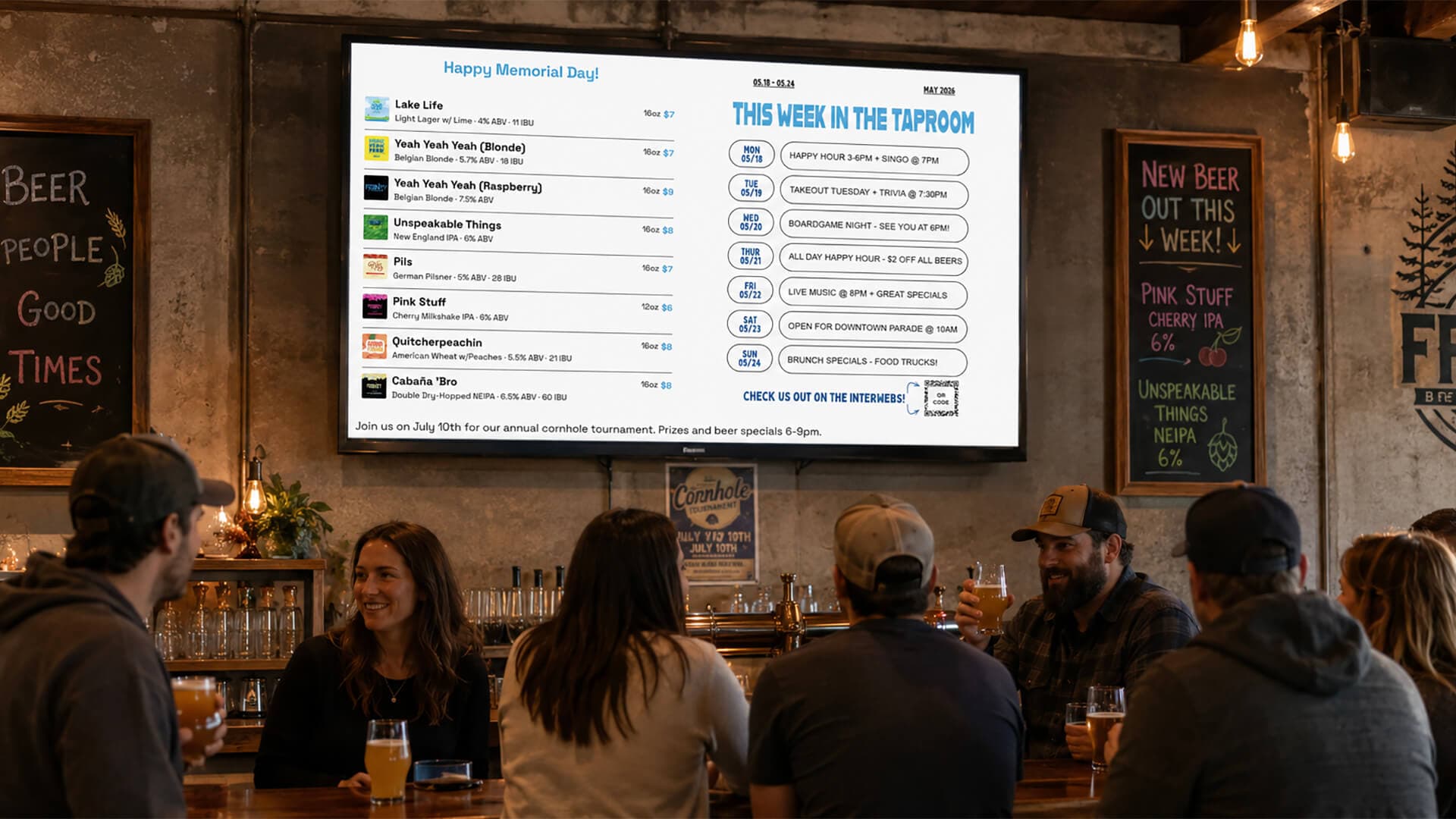
Three options:
- Download an app onto your smart TV
- Use a web browser on your smart TV
- Use a streaming stick on any TV
Then pick a tap list or slideshow you want to display, enter the pairing code on the TV, and you're live. The whole setup takes about 30 minutes the first time and zero touch every time after that.
We've all seen it: chalkboards get messy, paper menus get wet, PowerPoints are tedious to update. That's why most breweries go with a TV-mounted digital tap list within their first year. But the path to a good one is full of half-built tools, generic digital-signage products that don't understand ABV or IBU, and DIY setups that look great on day one and terrible by month three.
This guide walks through what actually works in 2026, what hardware you need, how to pick software, the literal step-by-step, and the mistakes to skip.
What You'll Need
Three things, none of them exotic:
- TV (Obviously). Any modern smart TV will work because it has a built-in browser. If your TV is older, plug in a 4K Fire TV Stick, Chromecast with Google TV, or Roku, they all include browser apps that load tap-list software just fine. Budget-wise: $30–50 if you don't already have a streamer. One catch: the newest cheap Fire TV Sticks (Select and HD) run Vega OS and screensaver-blank your menu, so check which devices work before you buy.
- Internet. Wi-Fi is fine for most taprooms. Hardwired Ethernet is more reliable if your bar is far from the router. Don't worry about bandwidth, a tap list display is text + tiny images, well under 1 Mbps.
- Tap list display software. The piece that actually matters. More on choosing the right one in the comparison section below.
How to Display a Tap List on a TV: a Step-by-Step Guide
- 1
Choose your TV setup
Any modern TV with a web browser works. Most smart TVs from the last 5 years qualify. If your TV is older, plug in a $30 Fire stick, Chromecast, or Roku and use the built-in browser app.
- 2
Pick tap list display software
Look for software purpose-built for breweries that handles real-time updates, multi-screen support, and brewery-specific fields like ABV / IBU / style. Generic digital signage tools work but force you to design every screen manually.
- 3
Sign up and add your beers
Add your current tap list: beer name, style, ABV, tasting notes, and label artwork. Most tools support spreadsheet import so you can load 20+ beers at once.
- 4
Customize your display
Pick fonts and colors that match your brand, choose one or two-column layouts based on your TV orientation, and add any extras (scrolling ticker for happy-hour, photo slideshow for events, custom footer message).
- 5
Connect your TV to the software
Most tap-list tools give you a unique pairing code per screen. Open the browser on your TV, enter the code, and your tap list goes live. No apps to install.
- 6
Test and refine
Walk back across your taproom and check readability. Fonts should be readable from your furthest seat. Update beer details from the dashboard and changes should push to the screen instantly without you touching the TV again.
Choosing TV Display Software for Your Brewery
Three rough categories of options, ordered by how much they cost you in time:
DIY tools (Google Slides, PowerPoint, Canva)
Free, but slow. You design every screen by hand, re-edit every keg rotation, and have no concept of beer-specific fields. Works for a brewery with 4 taps that never change. Falls apart at 12+ taps with regular rotation.
Generic digital signage (Yodeck, ScreenCloud, OptiSigns)
Powerful, but overkill.Built for retail / corporate signage, not breweries. You'll spend hours building tap-list templates that brewery-specific tools give you out of the box. Pricing starts around $15–25/screen/month.
Brewery-specific tap list software (BrewerBoard, Taplist.io, BeerMenus)
Purpose-built for taprooms. Native fields for ABV, IBU, style, label art. Multi-screen support out of the box. Real-time updates with no refresh. Spreadsheet imports.
BrewerBoard fits this category, built specifically for craft breweries, taprooms, and brewpubs that want a digital tap list without learning generic signage software. See what it looks like →
Common Mistakes to Avoid
- Type that's too small. Test from your farthest seat, not your laptop. Beer name should be readable in 1.5 seconds from across the room…if it isn't, bump the font size up until it is.
- Forgetting to update before opening. Pick software with team logins so your bartender can mark a keg empty the moment it kicks. The worst-looking tap list in the world is one that's 24 hours stale.
- No backup plan for Wi-Fi outages. Pick software that caches the last loaded view in the TV browser. That way if your internet drops mid-service, the screen keeps showing the most recent tap list until Wi-Fi comes back.
- One layout for every TV. Your bar, patio, and dining room have different sight lines and different customers. Pick software that supports per-screen layouts. For example, the bar TV gets the full list with prices, patio highlights seasonals, dining room shows pairings.
Frequently Asked Questions
What's the cheapest way to display a tap list on a TV?
A TV you already own + a free or low-cost cloud tap list service is the cheapest path. The hidden cost is your time: free DIY options (Google Slides, PowerPoint) require you to manually rebuild the slides every time a beer rotates. Purpose-built tap list software typically pays for itself the first week in staff time saved.
Do I need a special TV?
No. Any TV with a built-in browser works, or any TV plus a $30–50 streaming stick (Fire TV, Chromecast, Roku) that includes a browser app. Brewery-specific tap-list software runs in the browser; no proprietary hardware is needed.
Can I show different content on different TVs at the same brewery?
Yes…with the right software. Each TV should get its own unique pairing code so you can show, for example, the full tap list on your bar screen, seasonal beers only on the patio, and food-friendly picks in the dining room. Tools that only support one configuration per account force every TV to show the same thing.
Can my bartenders update the tap list without me?
Yes, if your software supports team accounts or manager roles. Look for tools that let you grant access to staff without sharing your owner login. Once granted, they can mark kegs empty, add new pours, or tweak prices from any device.
Does this work with Untappd?
Some tap list display tools integrate with Untappd so your existing brewery menu syncs automatically (no double-entry). BrewerBoard has Untappd integration coming soon. Until then, the manual entry takes a few minutes per beer and supports spreadsheet import for bulk loads.
What happens if my Wi-Fi goes down?
Most browser-based tap-list tools cache the last loaded view in the TV browser, so the existing tap list stays on screen even if internet drops. You just can't push updates until Wi-Fi comes back. Some tools also offer an offline-first mode for breweries with unreliable connections.
How big should the text be on a brewery TV menu?
Big enough to read from your furthest customer seat. A common starting point: beer name in 28–36pt, details in 14–18pt, prices in 18–22pt on a 50" TV. Adjust up if your taproom is large or down if you're using a smaller monitor near the bar.
Ready to Set Up Your Own Digital Tap List?
BrewerBoard is purpose-built for craft breweries, taprooms, and brewpubs. Set up takes about 30 minutes; we'll have your tap list on your TV the same day.
See BrewerBoard →